YettyOpen Beta
Orders, your way

Your steps.
Our accounting.

Rename every step to the words you already say out loud, and let the moments that matter happen by themselves. Underneath, the money keeps travelling the one road it has always travelled, so nothing you rename can ever break a refund.

Seven ready-made flows · rename any step · automations that cannot double-fire

The whole idea

Two layers, and only one
of them is yours to move.

Underneath there is a spine the money walks: waiting to be paid, paid, fulfilled, completed, and the honest exits of refunded and cancelled. That spine never changes, which is why every refund, every report and every number stays comparable. On top of it you write your own story in your own words. Nothing you rename can reach down and touch the money.

1

Pick the flow you actually have

Made to order, pickup, bookings, wholesale, tickets, and more. Start from the one that already looks like your week instead of bending your week around a tool.

2

Say it in your own words

Rename a step to "Baking", "At the framer", "Ready for pickup". Add one, drop one, reorder them. The order screen starts speaking your language.

3

Let the small stuff happen

Reaching a step can email the buyer, tag the order, ping you or call something of your own. Sitting in a step too long can nudge you before the customer does.

Never touched any of this? Then nothing changed. A store that has not customised its steps runs exactly the way it ran yesterday, down to the byte.
The real screens

The order desk, as it ships

Real captures of a live Yetty store dashboard. Buyer names and addresses are invented or cropped out of every frame.

1 / 4
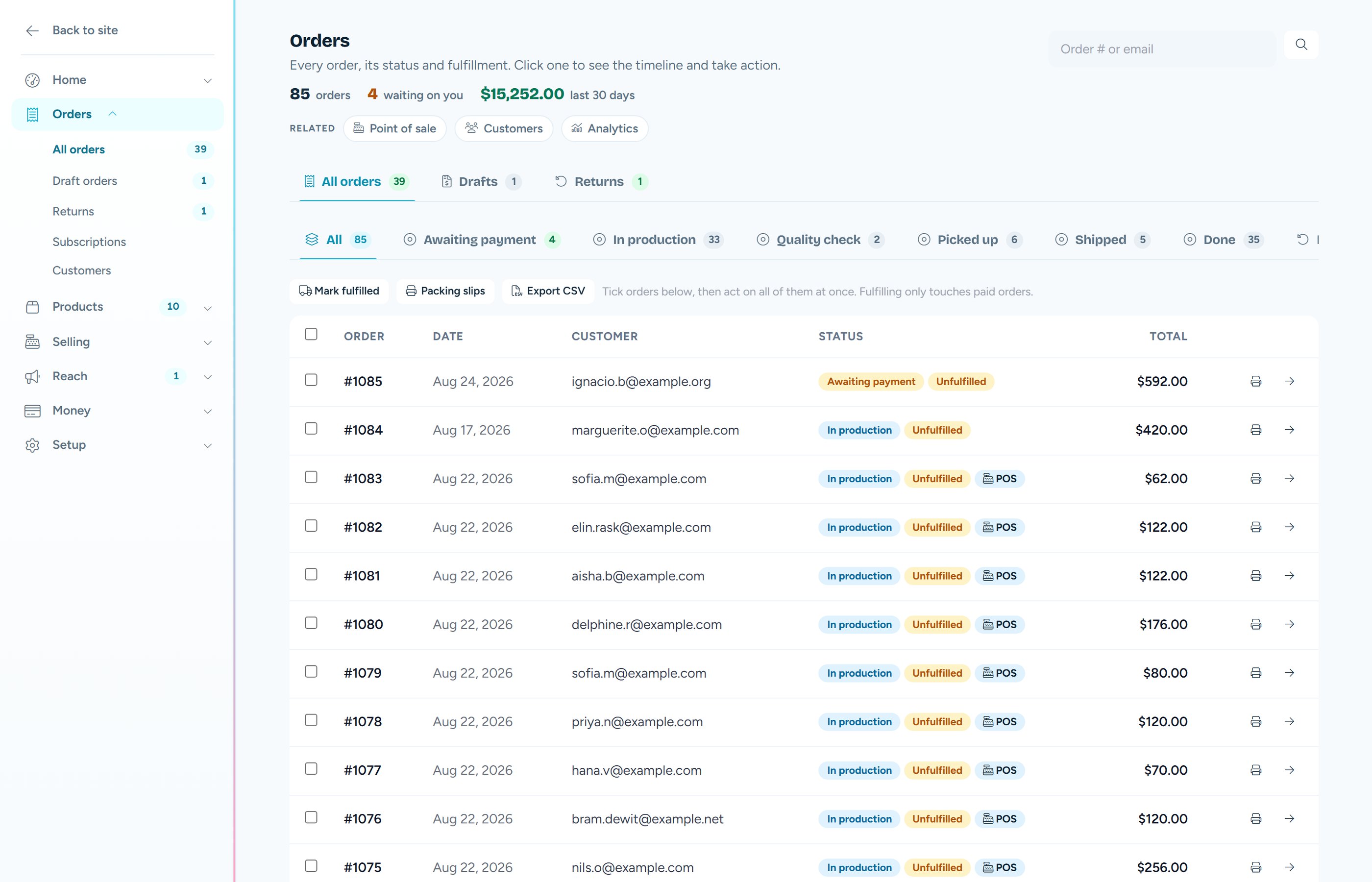
The Orders screen with status tabs, paid orders and refunds
One list, one truth

Web orders, phone orders and till sales in the same place, with the same timeline.

See what it does
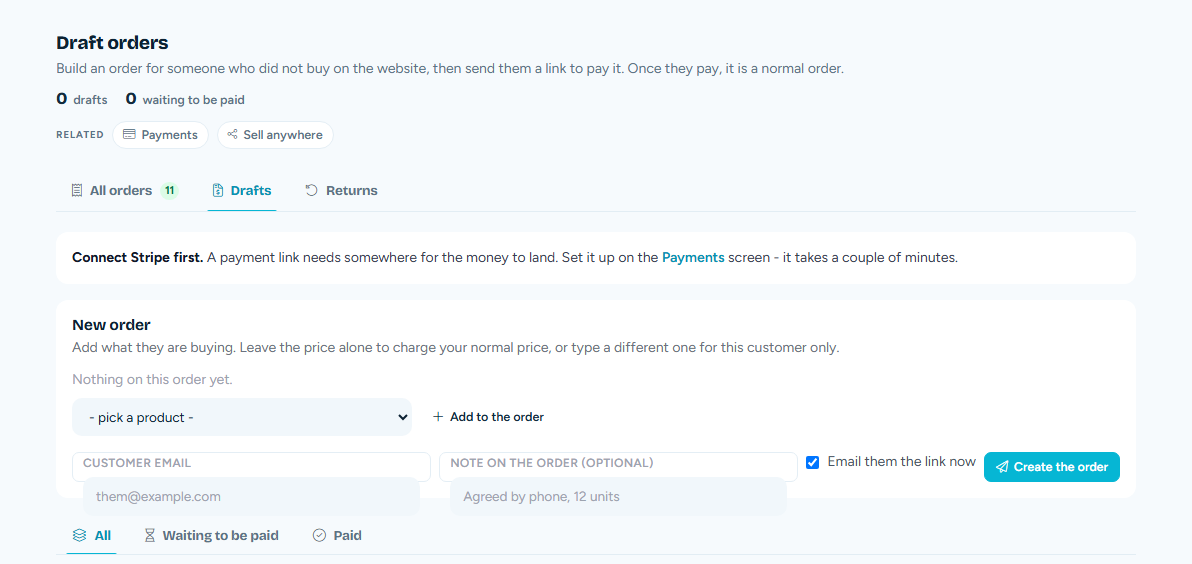
The Draft orders screen, where an owner builds an order and sends a link to pay it
Orders you make yourself

Build it, set the price you agreed, send a link. Once they pay it is a normal order.

See what it does
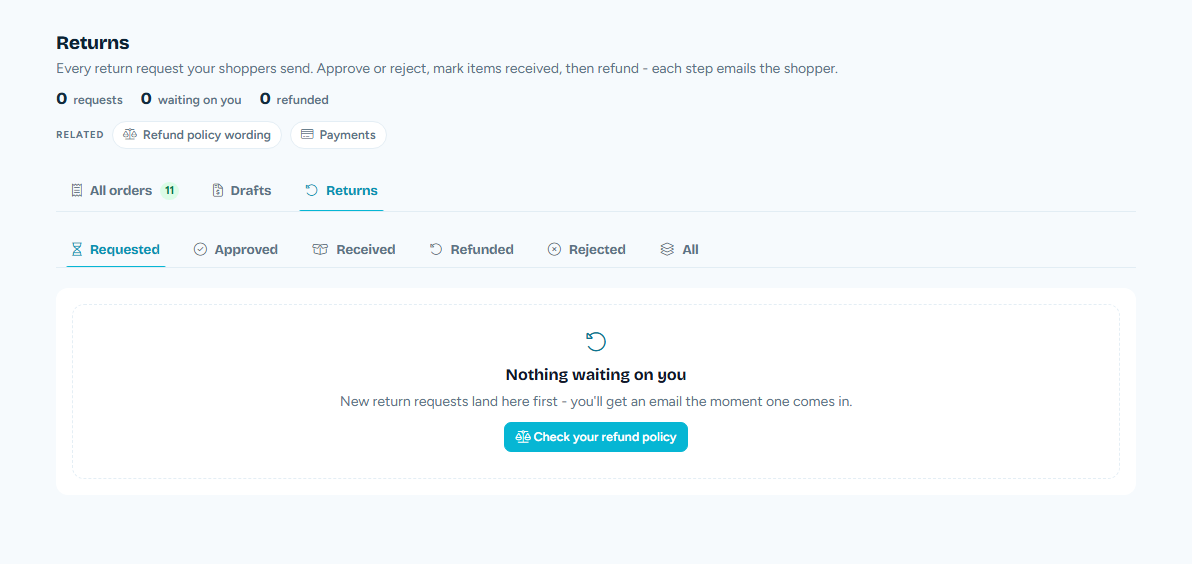
The Returns screen with requested, approved, received and refunded tabs
Returns, step by step

Approve, mark received, refund. Each step emails the shopper by itself.

See what it does
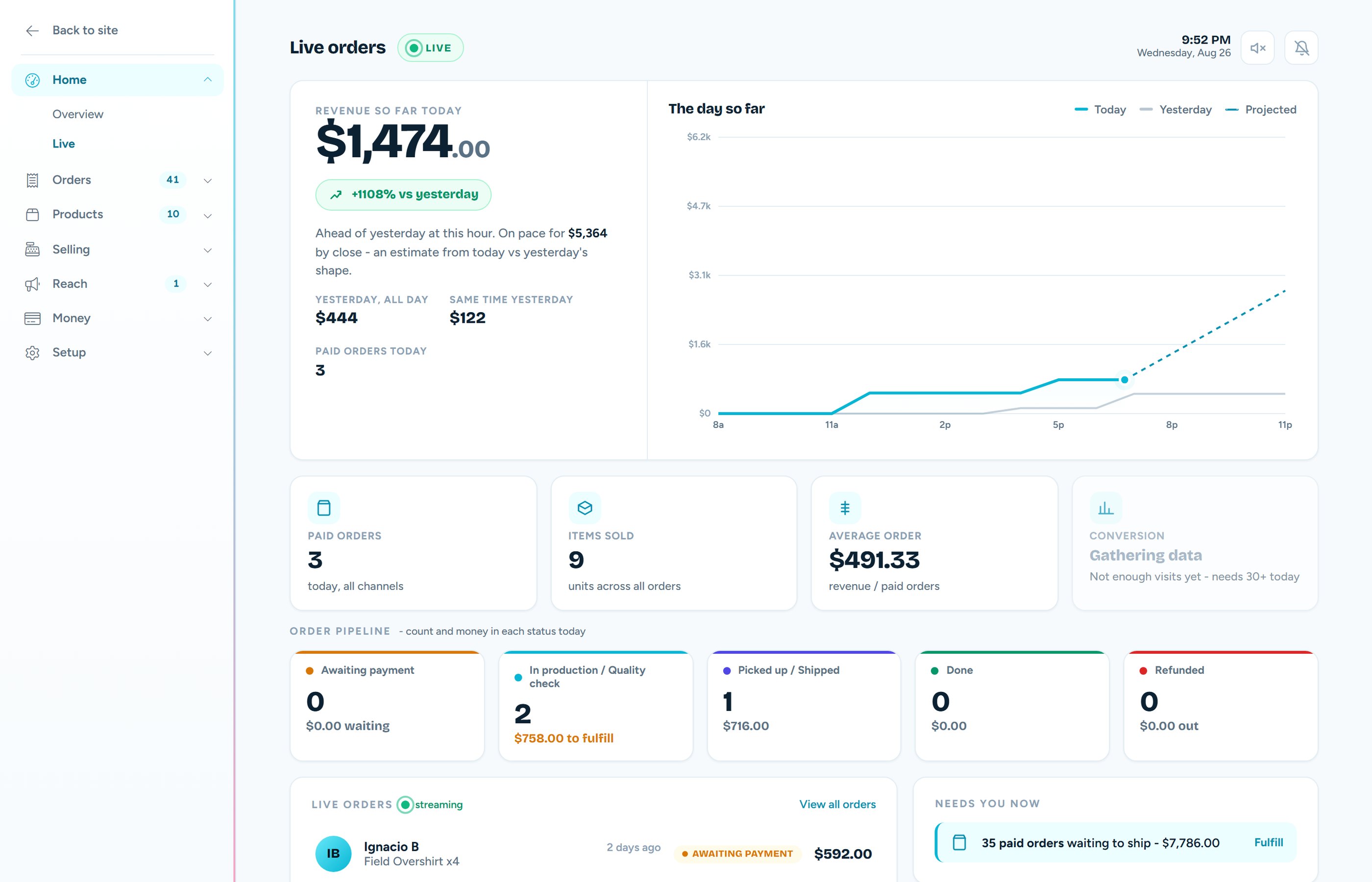
The Live Orders cockpit with revenue so far today and the order pipeline
The day, live

Money and count in every status, and new orders sliding in as they happen.

See the whole store
From placed to put to bed

Seven things an order desk needs

All of it shipped, all of it on the $19 store, none of it an upsell.

01

A timeline that cannot be tidied up

Every order keeps a written history: placed, paid, shipped, refunded, and every note in between. It is written as things happen rather than a status box being painted over, so the story of an order is still there next year when somebody asks.

  • Mark fulfilled, add tracking, print a packing slip.
  • Refund in full or in part, straight from the order.
  • The money always moves at the payment provider first, and only then in your books.
  • Web, phone and counter sales all keep the same kind of history.
02

Your orders travel your way

Seven ready-made flows to start from, then rename every step to the words you already use. Some shops end an order two different ways, and that is allowed too: an order can finish as picked up or as shipped, never as both and never as one after the other.

  • Made to order, pickup, bookings, wholesale, tickets and more, as starting points.
  • Moving between two steps that mean the same thing to the money costs nothing at all.
  • Crossing a real boundary runs the proper transition with every guard it has.
  • Never customised it? Your shop is unchanged, exactly as it was.

This is why renaming is safe. "Baking" means paid and "Ready for pickup" means fulfilled, so your reports, your refunds and anything reading your shop from outside keep speaking one vocabulary while you speak your own.

03

The busywork does itself

Say what should happen the moment an order reaches a step, and it happens without you. Say how long is too long to sit in a step, and you get nudged before your customer has to ask.

  • Email the buyer, tag the order, notify yourself, or call a webhook of your own.
  • A rule can never fire twice for the same order, even if something is retried.
  • Every firing is written down, so you can see what ran and when.
  • Nothing is on until you turn it on. An empty flow sends nothing.
04

Change an order without breaking the books

They ordered the wrong size. They want to add a mug. Both are normal, and neither one is allowed to quietly rewrite what was charged. Adding sends a link for exactly the difference, and the item joins the order when that link is paid. Removing something that has not shipped is a partial refund through the same engine every refund uses.

  • Anything already fulfilled is left alone. What is in their hands is a return, not an edit.
  • Removed units go back on the shelf they came off, including the right location.
  • One-tap wallets cannot be offered on a top-up link, and the screen and the email say so.
  • An edit never moves the order to a different step. A cake that lost a candle is still baking.
05

Orders you make yourself

Someone ordered by phone, by email, or across a table at a fair. Build the order, type the price you actually agreed if it is not the shelf price, and send them a link to pay. When they do, it lands in your shop like any other sale.

  • The pay link is the same secure page a card checkout uses. Nothing bespoke, nothing weaker.
  • A price you set for one customer is sealed to that order and cannot be reused elsewhere.
  • Stock, the customer record, the receipt and the timeline all behave as normal.
06

Returns, handled properly

A shopper asks with their order number and their email, so nobody has to make an account to send something back. You approve or reject, mark the goods received when they turn up, then refund from the same order. Each step emails them, which is most of what a return actually is.

  • The lookup is exact, so one shopper can never see another's order.
  • They pick the items and the quantity, with a reason you can read later.
  • The refund is the same engine as every other refund, so the money is never faked.
  • Standing at the counter instead? The register can do all of this face to face.
07

It can leave in more than one box

Half of it is ready and half is on backorder, which is an ordinary Tuesday. Each shipment is its own record with its own carrier and tracking number, and the order honestly shows as partly done until the last thing goes.

  • A recognised carrier turns a tracking number into a real link.
  • An unrecognised one keeps the number and does not invent a link that breaks.
  • A digital-only order has nothing to ship, so it never wears a stuck label.
  • Buyers get told it shipped, and packing slips print with no extra setup.
Straight answers

Running orders, asked plainly

Can I rename order statuses to my own workflow?

Yes. You pick how your business actually flows and rename every step to the words you already use, like "In production", "Baking" or "Ready for pickup". Underneath, the money still moves along the same fixed spine of paid, fulfilled and completed, so a refund, a report and your accountant all keep working exactly as before. Your words sit on top; they never rewrite what the money did.

Can I change an order after it has been paid?

Yes, and it never rewrites the charge. Adding something sends the buyer a link for exactly the difference, and the item joins the order when that link is paid, not when you click. Removing something that has not shipped yet issues a partial refund through the same engine every other refund uses, and the units go back on the shelf they came off. Anything already fulfilled is a return rather than an edit, so it is left alone.

Can I take an order over the phone?

Yes. Build the order yourself, set the price you actually agreed if it is not the shelf price, and send a link they can pay. Once they pay it becomes a normal order in your shop with the same stock, the same customer record and the same timeline as anything bought from the website.

How do returns work?

A shopper asks for a return with their order number and their email, so no account is needed. You approve or reject it, mark the goods received when they turn up, then refund straight from the same order. Each step emails them, so nobody has to chase you for news.

Can an order ship in more than one box?

Yes. Each shipment is its own record with its own carrier and tracking number, and the order shows as partly fulfilled until the last item leaves. If we recognise the carrier the tracking number becomes a real link, and if we do not we keep the number and do not invent a link that would break.

Can the busywork happen by itself?

Yes. You can say what happens the moment an order reaches a step: email the buyer, tag the order, notify yourself, or call a webhook of your own. You can also ask to be nudged when something has been sitting in one step too long, which is how a forgotten order stops being a surprise a week later.

Do orders from the counter mix in with online orders?

They are the same orders. A sale rung on the register is created by the same engine, with the same stock movement, the same customer record and the same timeline, and it simply carries a label saying it came from the till. There is no second list to reconcile.

Ready when you are

Let your orders speak your language.

Free to build, free to try. Every step you rename, every rule you set and every refund you make is a version you can roll back.