YettyOpen Beta
The till, included

Market day,
counted properly.

The same store that runs your website also runs your counter. Ring a sale, take the cash, send a link for the card, hand over a receipt. When the signal goes, it keeps selling and squares up later.

Cash, payment links and split bills · 0% Yetty fee on your sales · works with no signal

Why this is different

It is not a second system.
It is the same shop.

Most small sellers end up with a till that knows nothing about the website and a website that knows nothing about the market stall. Then they spend Sunday night making the two numbers agree. Here there is one shop. A sale at the counter takes the stock down, grows the same customer, and lands in the same list as an order that came in overnight.

1

Open it on what you own

A laptop at the counter becomes a two-pane register with a keyboard flow. A phone at a stall becomes big buttons you can hit without looking. Nothing to install, nothing to buy.

2

Ring it the way it happened

Tap the products, scan them, or just type what they are buying. Take cash, send a link for the card, or split one bill across both and a gift card too.

3

It is already in the books

The stock is down, the customer is on the list, the sale is on the same timeline as every online order. There is no evening where you type it all in again.

The real screens

This is the actual register

Real captures of a live Yetty store and its own dashboard, not drawings. Every buyer name and address is cropped out or invented.

1 / 4
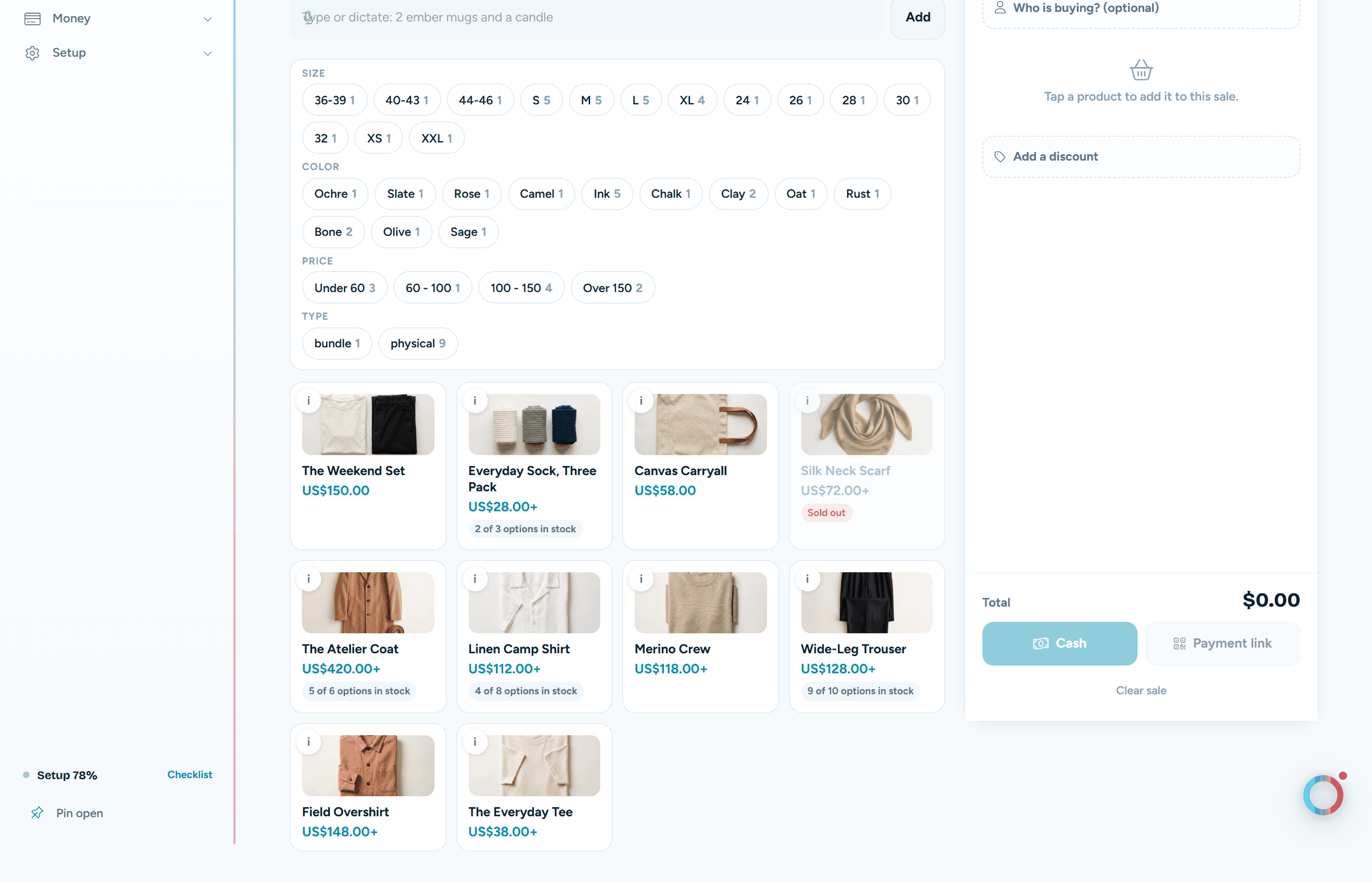
The register with product tiles, filters and the open sale beside them
The counter

Your real catalogue, narrowed by size and colour, with the open sale on the right.

See what it does
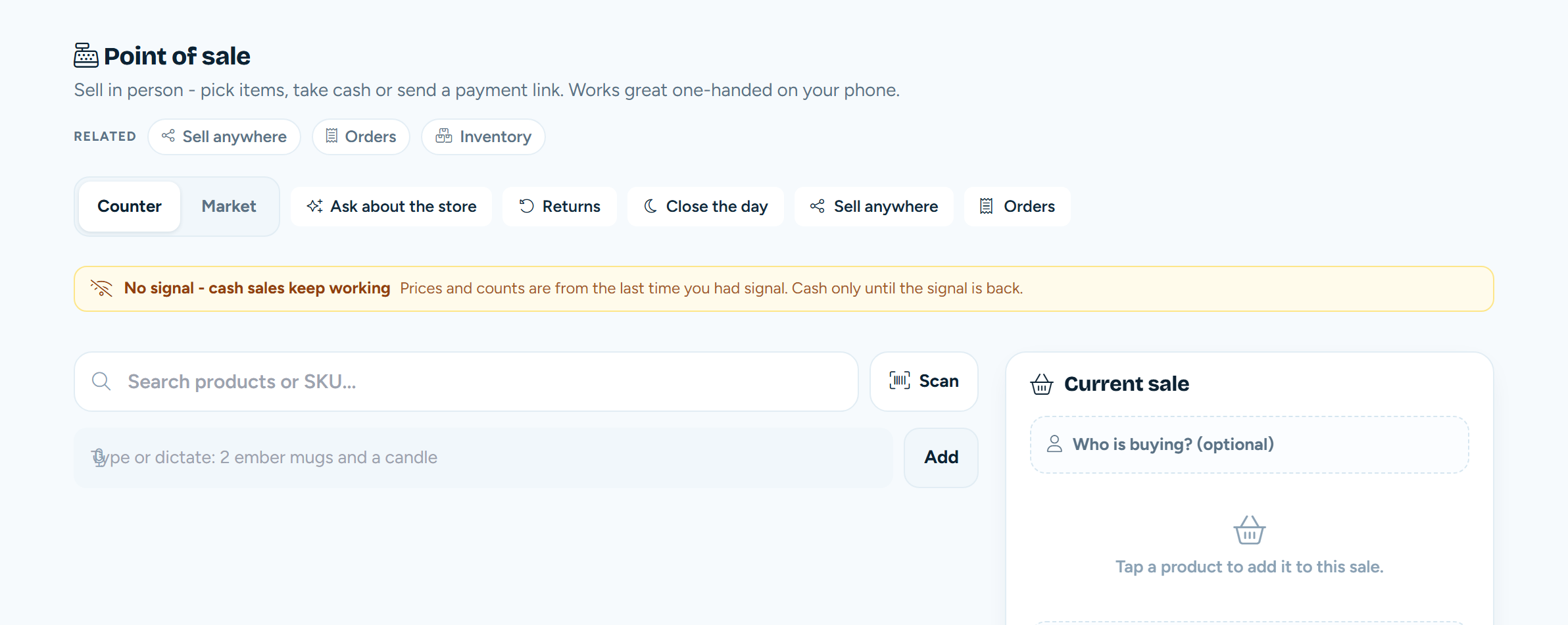
The register saying the signal has gone and cash sales keep working
No signal

It says so plainly, keeps taking cash, and tells you prices are from the last time you had signal.

See what it does
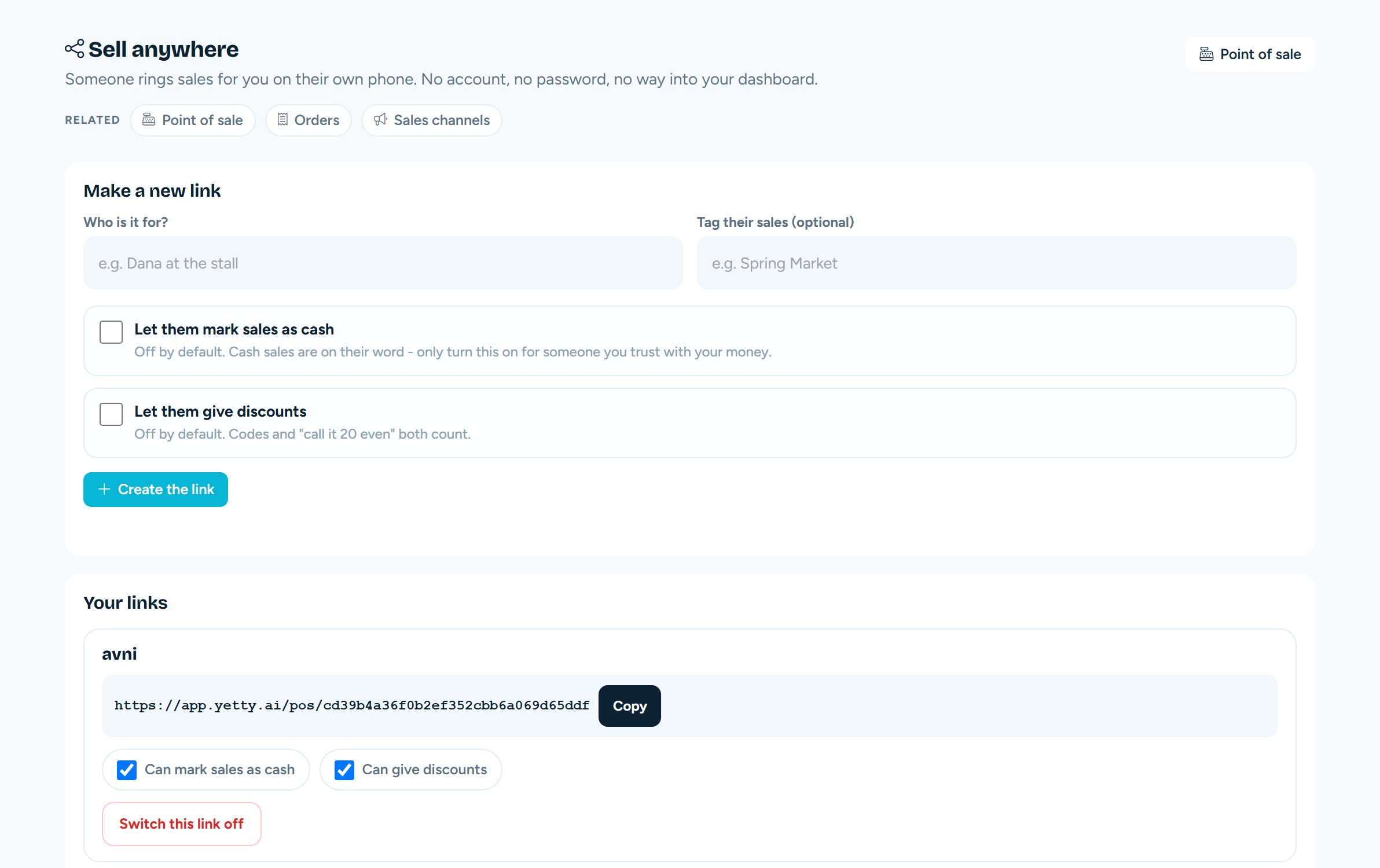
The screen for making a link that lets a helper ring sales on their own phone
Sell anywhere

Make a link for a helper, decide what they may do, switch it off when the fair ends.

See what it does
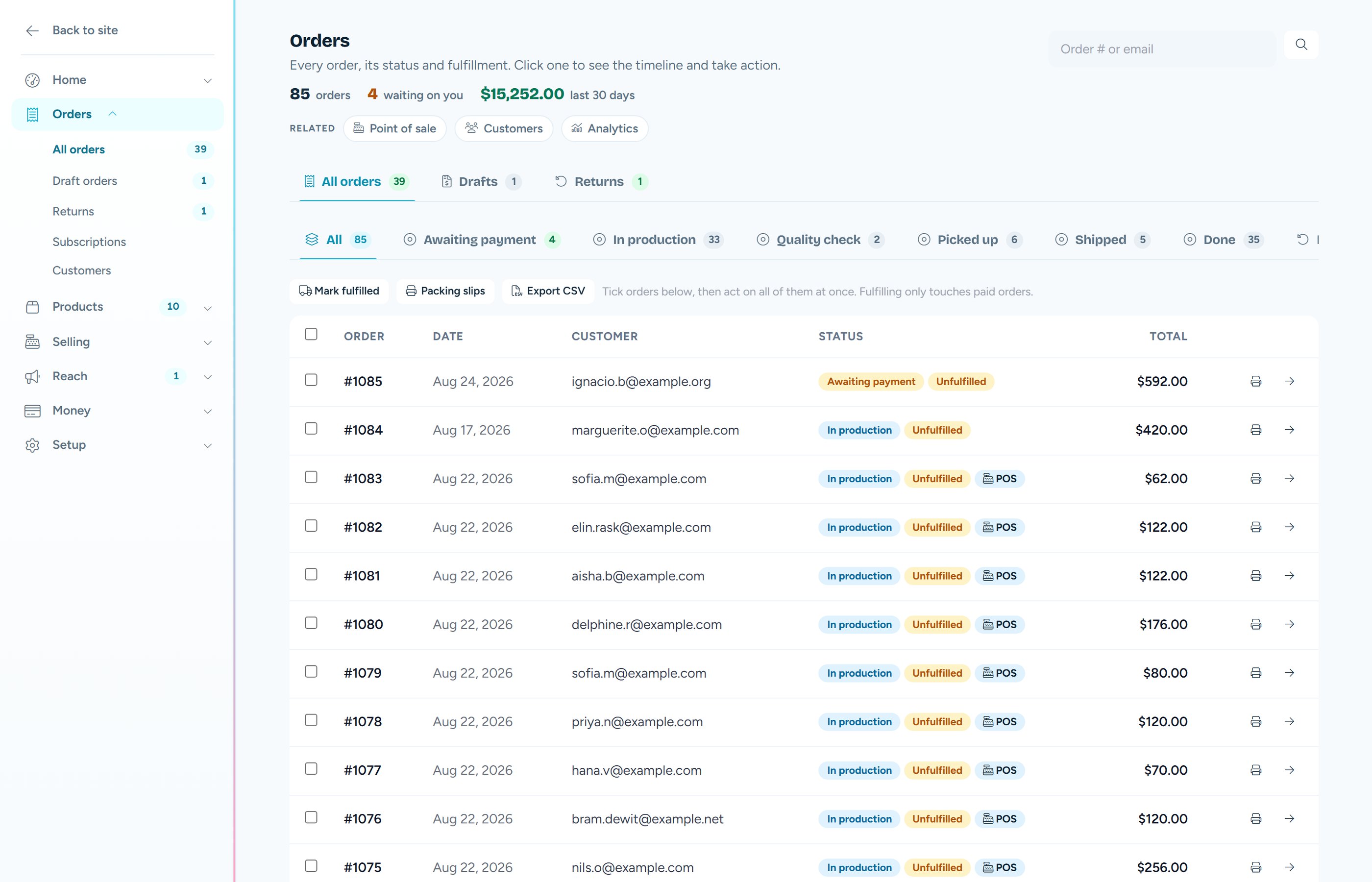
The Orders screen with status tabs, paid orders and refunds
It lands as a normal order

A till sale sits in the same list as your web orders, with the same timeline.

See how orders run
Everything the counter needs

Seven things, all of them shipped

Not a roadmap. Each one is running in stores today, and each one is here because a real counter needed it.

01

A real till, on the screen you already have

Counter mode is a proper two-pane register: the catalogue on one side, the open sale on the other, and a keyboard flow that keeps up with a queue. Market mode makes everything big enough to hit one-handed on a phone while you are handing over a bag. Same sale, same shop, different hands.

  • Tap a product, or narrow the grid by size, colour, collection or price first.
  • Type or dictate "two bone tees in medium and a scarf" and the basket fills itself.
  • When two products could match, it shows you both to tap rather than guessing. When nothing matches it says so.
  • Add a discount to one sale without touching your published prices.

The quick-add box is deliberately literal. It matches on your SKUs and your real titles and refuses when it is unsure, because a register that quietly adds the wrong thing costs more than one that asks.

02

Cash, card, or a bit of each

Cash is instant: the money is already in the drawer, so the sale is paid the moment you tap it. For a card the register mints a payment link the buyer opens on their own phone, running the same secure checkout your website uses. And when someone wants to split the bill, you take what they hand you and the link charges exactly what is left.

  • A gift card comes off first, then cash, then a link for the remainder.
  • The sale only counts as paid when the card actually clears. No optimistic ticks.
  • Cancel a split and it tells you exactly how much to give back from the drawer.
  • The money goes to your own payment provider. Yetty takes 0% of it and never holds it.
03

It keeps selling when the signal drops

A church hall with one bar, a field in July, a basement market. The register notices, tells you in plain words, and carries on taking cash. Each sale is saved on the phone with its own ticket number, so nothing is held in your head or on a scrap of paper.

  • It says which prices and counts it is working from, so you are never guessing what it knows.
  • Back in signal, the queued sales go up one at a time and you watch them land.
  • A ticket can never be rung twice, even if the connection flickers mid-sync.
  • The day-close card tells you how many of the day's sales were taken offline.

Card payments need a connection, so they wait. The register says that out loud instead of taking a card it cannot charge.

04

Take a return without leaving the counter

Someone walks back in with a bag. Find the sale by order number, by email, or by the code printed on their receipt, then choose what actually happens: money back the way they paid, a swap for something else, or the value onto a store credit card.

  • An exchange puts the value on a card and attaches it to the new sale, so the difference is just the bill.
  • If the new thing costs less, the leftover stays on the card. A return never hands out cash the shop did not take.
  • No receipt at all? You can still give store credit at that item's lowest price, never cash.
  • A credit is always in the currency of the original sale, never converted behind your back.

Refunds, store credit and no-receipt returns are yours alone. A helper on a guest link cannot do any of them, and that is enforced where it counts rather than by hiding a button.

05

Let someone else sell for you

A friend minding the stall, a rep at a fair, your sister on the other side of the table. Send them a link and it opens the register on their own phone. No account, no password, and no way into your dashboard, your customers or your money.

  • Payment links are always allowed. Taking cash and giving discounts are off until you turn them on for that one link.
  • Every sale is tagged to the link, so "what did Dana sell at the spring market" is a question with an answer.
  • Switch a link off and it stops working on their very next tap.
  • Old sales keep their attribution forever, even after the link is retired.
06

Scan it, and hand them a slip

Point your phone camera at a barcode and the item drops into the basket. The scanner gun you already own works too, because it types like a keyboard and there is nothing to install. When someone wants paper instead of an email, print the receipt from the browser to whatever printer you have.

  • It looks for the barcode first, then falls back to your SKU, so a shop that only ever filled in one of them still works.
  • A manufacturer barcode and your own part number are kept as separate facts, which is also what Google wants in a shopping feed.
  • The receipt shows each part of a split payment separately, because that is what actually happened.
  • It carries the return code, so the same slip is what brings them back in.

There is no printer driver to install and no special till roll to buy. It is a normal page your browser prints, so it lands on the paper you already have, or as a PDF.

07

Know who rang it up

One till, several pairs of hands. Give everybody a short code they tap before a sale and every sale carries their name, so on Sunday morning you can see who sold what without handing anyone your login.

  • You can tighten whether one person may give discounts or take returns.
  • A mistyped code says so plainly and never locks anyone out. A queue on a Saturday must never meet a till that sulks.
  • It is attribution, not a lock. It puts a name on a sale, and that is exactly what it claims to do.
Simple money

The till is part of the $19 store.

There is no separate point of sale plan, no per-till fee and no per-person fee. Yetty takes 0% of your sales at the counter, exactly as it takes 0% online. You pay your own payment provider's card fees and nothing else.

Straight answers

Selling in person, asked plainly

Can I use Yetty as a point of sale system?

Yes. Every Yetty store comes with a register you can open on a laptop, a tablet or a phone, and a sale rung on it is a normal order in the same shop: the same stock comes down, the same customer record grows, the same timeline is written. On a laptop it is a two-pane counter register with a keyboard flow; on a phone it goes big-button for a market stall. It is part of the $19 a month store, not a separate product.

How do customers pay at the counter?

Cash is recorded instantly and the sale is paid the moment you tap it, because the money is already in the drawer. For a card, the register sends a payment link that the buyer opens on their own phone and pays through the same secure checkout your website uses. You can also split one bill across a gift card, some cash and a link for whatever is left.

Does the register work without internet?

Cash sales keep working with no signal. The register tells you the signal has gone, keeps taking cash, and saves each sale on the phone with its own ticket number. When the signal comes back they go up one at a time, and a ticket can never be rung twice. Card payments need a connection, so those wait, and the screen says so rather than pretending.

Can someone else sell for me without a login?

Yes. You send a helper a link that opens only the register on their phone: no password, no dashboard, nothing of your books. You decide per link whether that person may take cash or give a discount, every sale is tagged to the link so you can see who sold what, and switching the link off stops it on their very next tap.

Can I take a return at the counter?

Yes. Find the sale by order number, email or the code printed on their receipt, then hand the money back, swap it for something else, or put the value on a store credit card. With no receipt at all you can still give store credit at the item's lowest price, never cash, so the drawer stays safe. Every step lands on that order's timeline.

Do I need a card reader or special till hardware?

No. The register runs in the browser you already have on the device you already own, cash needs nothing at all, and a card is taken on the buyer's own phone through a payment link. If you want to scan, your phone camera works and so does any barcode scanner that plugs in like a keyboard. If you want to hand someone paper, the receipt prints from the browser to whatever printer you already have.

Can I see who rang up which sale?

Yes. Give everyone on the counter a short code they tap before a sale and each sale carries their name, so at the end of a Saturday you can see who sold what on one shared till without handing anyone your login. You can also tighten whether one person may give discounts or take returns.

Ready when you are

Open the till this weekend.

Free to build, free to try. The register comes with the store, and Yetty takes 0% of what you sell across the counter.